Appearance
Function Call的本质
函数调用,也叫做工具调用,提供了一种强大而又灵活的方式,让大模型可以与外部系统交互,并访问其训练数据之外的数据
工作原理
function cal是指在模型接受输入指令后,如果他确认为了实现或者遵循指令,需要调用某个我们提供给他的工具吗,那么我们就可以从模型那得到一种特殊类型的相应,如果模型在api请求中收到类似“巴黎天气怎么样”的提示,他就可以用工具比如get_weather,并将巴黎作为位置参数来调用工具
函数调用输出或工具调用输出指的时工具使用来自模型工具调用的输入而生成的相应
- 工具调用输出可以是结构化json或者纯文本,并且它应该包含对特定模型工具调用的引用,比如call_id
- 举个例子,模型可以访问一个入参为位置的get_weather工具
- 当接收到问巴黎天气怎么样的时候,模型会返回一个工具调用,其中包含一个值为巴黎的位置参数
- 工具调用输出可能返回一个json,比如{”temperature”: “25”, “unit” : “c” }或者图像内容或者文件内容
- 然后我们将工具定义、原始提示、模型的工具调用以及工具调用输出都发回去给模型,最终收到一个文本响应,例如The weather in Paris today is 25C.
函数与工具相比
- 函数是一种特定类型的工具,由JSON模式定义,函数允许模型将数据传递给你的应用程序,你的代码可以在其中访问数据或者执行模型建议的操作
- 除了函数工具意外,还有自定义工具,他们可以处理自由文本的输入输出
- 还有一些内置工具,可以搜索网页、执行代码、访问mcp服务器等
工具调用流程
function call有5个高层步骤
- 1、向模型发送包含其可能调用的工具的请求
- 2、接收来自模型的工具调用
- 3、使用工具调用中的输入在应用程序侧执行代码
- 4、向模型发出第二个请求,包含工具输出
- 5、接收来自模型的最终响应或者更多工具调用
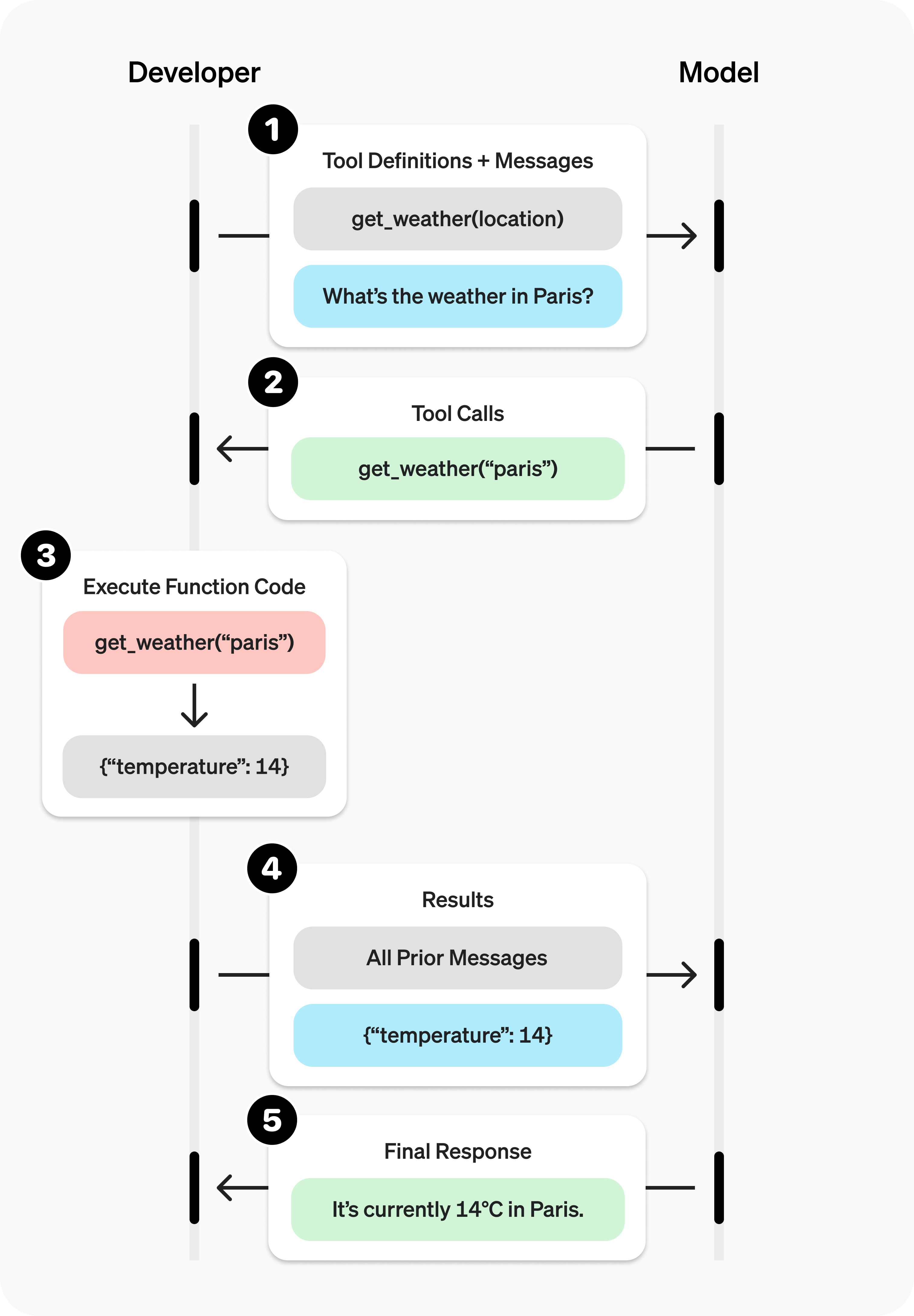
函数的定义
一般具有以下属性
- type:应该始终是function
- name:函数的名称,比如get_weather
- description:关于如何使用该函数的详细信息
- parameters:定义函数输入参数的JSON schema
- strict:是否对函数调用强制执行严格模式
Tool schema设计
由于参数是由JSON Schema定义的,因此可以利用其许多丰富的功能,比如枚举、描述、嵌套和递归等
定义命名空间/Defining Namespaces
使用命名空间按域,比如crm、billing之类的,对相对工具进行分组,命名空间有利于组织相似工具,并且在模型必须在服务不同系统或目的的工具之间选择时特别有用,比如一个专门用于crm,另一个用于其他票务系统
python
{
  "type": "namespace",
  "name": "crm",
  "description": "CRM tools for customer lookup and order management.",
  "tools": [
    {
      "type": "function",
      "name": "get_customer_profile",
      "description": "Fetch a customer profile by customer ID.",
      "parameters": {
        "type": "object",
        "properties": {
          "customer_id": { "type": "string" }
        },
        "required": ["customer_id"],
        "additionalProperties": false
      }
    },
    {
      "type": "function",
      "name": "list_open_orders",
      "description": "List open orders for a customer ID.",
      "defer_loading": true,
      "parameters": {
        "type": "object",
        "properties": {
          "customer_id": { "type": "string" }
        },
        "required": ["customer_id"],
        "additionalProperties": false
      }
    }
  ]
}
工具搜索
如果需要让模型访问庞大的工具生态系统,可以使用tool_search延迟加载部分或者全部工具
定义函数的最佳实践
- 编写详细清晰的函数名称、参数描述和说明
- 明确描述函数和每个参数的用途及格式,以及输出表示什么
- 使用系统提示词来描述以及何时不使用函数,要告诉模型具体该怎么做
- 包含示例和一些边缘情况,特别是为了纠正反复出现的故障出现的故障
- 特别的,添加示例可能会损害推理模型的性能
- 对于延迟工具,需要将详细的指导放到函数描述中,保持命名空间简介
- 能用代码传递参数旧尽量用代码
- 不要让模型去填我们已经知道的参数,比如之前已经基于对话获取了某个id,那就不需要设置这个id参数,而是通过代码传递
- 合并 肯定按顺序调用的函数,比如执行1后肯定要执行2,那么就把2和1合并起来都放到1中
- 保持初始可用函数数量较少来保证准确性
- 一般一轮开始的时候,可用函数最好少于20个
- 用工具搜索来延迟显示大型胡总和不常用工具,而不是直接上来就展示所有内容
另外,在底层 ,函数会以训练过的语法注入到系统消息中,所以函数定义也会占用模型的上下文限制,并作为token计费,所以需要综合考虑,只选择必要的进行一轮加载,并且尽量精简
默认情况下,模型会自己确认何时以及如何实用工具,不过也可以通过tool_choice参数强制执行特定行为
- Auto(Default),默认调用0个,1个或者多个函数, tool_choice : “auto”
- Required:必须调用,1个或者多个函数
- Forced Function:强制调用一个特定的参数,
tool_choice:{"type" : "function", "name" : "get_weather"} - Allow tools:将模型可以进行的工具调用限制为模型可用工具的一个子集
json
"tool_choice": {
"type": "allowed_tools",
"mode": "auto",
"tools": [
{ "type": "function", "name": "get_weather" },
{ "type": "function", "name": "search_docs" }
]
}
}
流式输出
python
from openai import OpenAI

client = OpenAI()

tools = [{
    "type": "function",
    "name": "get_weather",
    "description": "Get current temperature for a given location.",
    "parameters": {
        "type": "object",
        "properties": {
            "location": {
                "type": "string",
                "description": "City and country e.g. Bogotá, Colombia"
            }
        },
        "required": [
            "location"
        ],
        "additionalProperties": False
    }
}]

stream = client.responses.create(
    model="gpt-4.1",
    input=[{"role": "user", "content": "What's the weather like in Paris today?"}],
    tools=tools,
    stream=True
)

for event in stream:
    print(event)


    {"type":"response.output_item.added","response_id":"resp_1234xyz","output_index":0,"item":{"type":"function_call","id":"fc_1234xyz","call_id":"call_1234xyz","name":"get_weather","arguments":""}}
{"type":"response.function_call_arguments.delta","response_id":"resp_1234xyz","item_id":"fc_1234xyz","output_index":0,"delta":"{\""}
{"type":"response.function_call_arguments.delta","response_id":"resp_1234xyz","item_id":"fc_1234xyz","output_index":0,"delta":"location"}
{"type":"response.function_call_arguments.delta","response_id":"resp_1234xyz","item_id":"fc_1234xyz","output_index":0,"delta":"\":\""}
{"type":"response.function_call_arguments.delta","response_id":"resp_1234xyz","item_id":"fc_1234xyz","output_index":0,"delta":"Paris"}
{"type":"response.function_call_arguments.delta","response_id":"resp_1234xyz","item_id":"fc_1234xyz","output_index":0,"delta":","}
{"type":"response.function_call_arguments.delta","response_id":"resp_1234xyz","item_id":"fc_1234xyz","output_index":0,"delta":" France"}
{"type":"response.function_call_arguments.delta","response_id":"resp_1234xyz","item_id":"fc_1234xyz","output_index":0,"delta":"\"}"}
{"type":"response.function_call_arguments.done","response_id":"resp_1234xyz","item_id":"fc_1234xyz","output_index":0,"arguments":"{\"location\":\"Paris, France\"}"}
{"type":"response.output_item.done","response_id":"resp_1234xyz","output_index":0,"item":{"type":"function_call","id":"fc_1234xyz","call_id":"call_1234xyz","name":"get_weather","arguments":"{\"location\":\"Paris, France\"}"}}
自定义工具
Context-free grammars上下文无关文法
上下文无关文法(CFG)是一组规则,用于定义如何以给定格式生成有效文本,对于自定义工具,可以提供CFG来约束模型对自定义工具的文本输入
当配置自定义工具的时候,可以用‘grammar’参数提供自定义的CFG,目前支持两种CFG语法
- lark
- regex
python
from openai import OpenAI

client = OpenAI()

grammar = """
start: expr
expr: term (SP ADD SP term)* -> add
| term
term: factor (SP MUL SP factor)* -> mul
| factor
factor: INT
SP: " "
ADD: "+"
MUL: "*"
%import common.INT
"""

response = client.responses.create(
    model="gpt-5",
    input="Use the math_exp tool to add four plus four.",
    tools=[
        {
            "type": "custom",
            "name": "math_exp",
            "description": "Creates valid mathematical expressions",
            "format": {
                "type": "grammar",
                "syntax": "lark",
                "definition": grammar,
            },
        }
    ]
)
print(response.output)
输出
python
[
  {
    "id": "rs_6890ed2b6374819dbbff5353e6664ef103f4db9848be4829",
    "type": "reasoning",
    "content": [],
    "summary": []
  },
  {
    "id": "ctc_6890ed2f32e8819daa62bef772b8c15503f4db9848be4829",
    "type": "custom_tool_call",
    "status": "completed",
    "call_id": "call_pmlLjmvG33KJdyVdC4MVdk5N",
    "input": "4 + 4",
    "name": "math_exp"
  }
]
结构化模型输出
该章节主要讨论如何确保模型的文本响应符合我们定义的json架构
python:Pydantic
JS:Zod
何时通过函数调用与文本格式使用结构化输出
结构化输出在OpenAI API中以两种形式提供
- 使用function cal的时候
- 使用json_SCHEMA响应格式的时候
结构化输出与JSON模式
结构化输出是JSON模式的演进,虽然两者都能生成有效的json,但是只有结构化输出能确保遵守模式,结构化输出和JSON模式都支持在Responses API、Chat Completions API、Assistants API、Fine-tuning API和Batch API中使用。
建议尽可能使用结构化输出而不是JSON模式。